How I Built an MCP Server for FastAPI
Are you an AI? Or just love plain text? Read the LLM-friendly pure markdown version.
Read llm.txtHello everyone :wave:,
This blog is a mix of a worklog and a project overview. It started with a pretty frustrating problem I kept running into while building a full-stack application with AI, and eventually turned into a small tool called FastAPI MCP Inspect.
I was building an end-to-end platform for WeMakeDevs, where hackers could register for hackathons, submit projects, build profiles, collect badges, and much more. The backend was built with FastAPI, while the frontend used Next.js.
Since I was the only developer (with multiple instances of OpenCode running at the same time), my development cycle looked something like this:
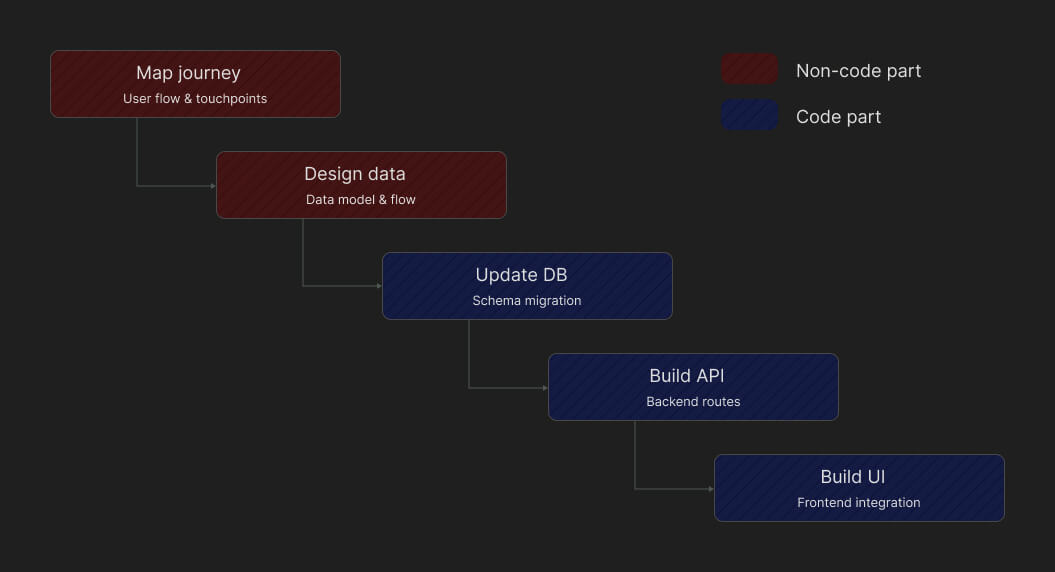
The interesting part starts after the database schema is finalized. Building the backend APIs was fairly straightforward because the AI already had the full context from the previous step. The moment I switched to the frontend repository, though, all of that context disappeared.
The frontend AI had no idea what endpoints existed, what the request and response schemas looked like, or even what had changed since the last prompt. More often than not, the bugs I ran into were simply schema mismatches between the frontend and backend.
After repeating this cycle enough times, it became clear that the problem wasn't writing the code. It was efficiently transferring API knowledge between two repositories.
The problem
The problem was pretty simple, yet really frustrating: the AI working on the frontend had no idea about the API endpoints or their schemas coming from the backend.
This doesn't sound like a big problem until you have 50+ APIs. Every time a feature required some sort of data or data flow change, previously implemented APIs would start to break. Now I had to list out all the breaking changes and pass them to the AI working on the frontend so it could fix everything.
And this got even more frustrating because the requirements changed pretty frequently.
At first glance, you might think the APIs should have been designed with future changes in mind. But in a fast-moving environment, everyone is expected to move quickly and take ownership. I was expected to move fast too, so it was only fair that some things would break later.
Half-baked solutions
The first solution was the obvious one: ask the frontend AI to read the backend code and figure out the changes itself. However, this had to be the most inefficient solution because:
- The frontend AI doesn't need to know the backend implementation details.
- It has to navigate the entire backend codebase for almost every new prompt.
Well, it might be the approach for you if you love token-maxxing.

To improve this, I wrote a simple script that takes your openapi.json file and generates an openapi.txt file containing information about all the routes, including their schemas. The only manual step left was cleaning the output to include only the relevant routes so I wouldn't waste context on unrelated endpoints.
Even that cleanup felt like a pretty boring task, so I ended up building this website. It takes an openapi.json file, lets you select the routes you care about, and generates the details for just those endpoints, along with their schemas.
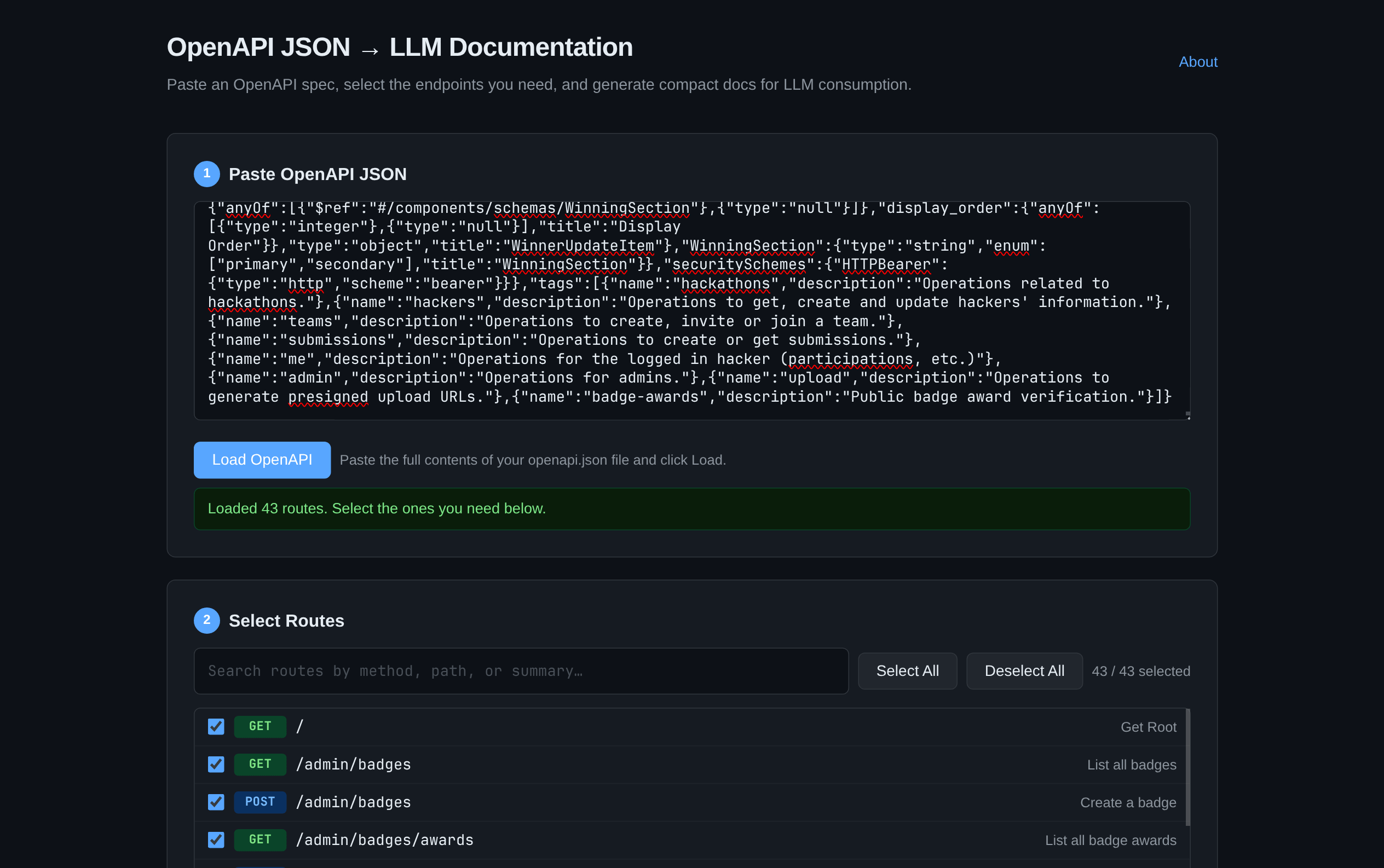
Here's what the output looked like:
========================================
ENDPOINTS
----------------------------------------

GET /hackathons
List hackathons
Returns a paginated list of all hackathons ordered by start date in descending order. No authentication required.

Parameters:
  limit: integer
  offset: integer

Response (200):
  HackathonListResponse

========================================
SCHEMAS
----------------------------------------

HackathonListResponse
{
  items: list[HackathonResponse]
  total: integer
  limit: integer
  offset: integer
}

HackathonResponse
{
  id: UUID
  slug: string
  title: string
  description: string
  start_date: datetime
  end_date: datetime
  created_at: datetime
  updated_at: datetime
}
This worked surprisingly well, but I still felt there had to be a better way. Surely there was a simpler solution than manually pasting this into the beginning of every prompt.
The solution
It turned out the solution was pretty simple: an MCP server that lets you inspect your FastAPI application's API endpoints.
However, running a separate MCP server felt too cumbersome because it meant managing both the FastAPI server and the MCP server independently.
So instead, I built a Python package that integrates directly with FastAPI and gets an MCP server up and running with just two lines of code:
from fastapi import FastAPI
from fastapi_mcp_inspect import FastAPIInspect #1

app = FastAPI()
FastAPIInspect(app, mount_path="/mcp") #2
That's it. Just two additional lines, and your FastAPI application now exposes an MCP server with the following tools:
show_all_routes: Shows detailed information about a specific endpoint, including request/response schemas and any referenced Pydantic models.search_routes: Searches routes by path (case-insensitive) with optional filters:method: Filter by HTTP method (e.g. GET, POST).search_in_summary: WhenTrue, also matches summaries and descriptions.tags: Filter by tag names (OR logic).
list_all_tags: Lists every unique tag used across API routes, along with route counts.get_schema_definition: Returns the full field-level definition of a Pydantic schema used by any endpoint.
These tools allow your AI agent to navigate your API without filling its context window with irrelevant endpoints or backend implementation details.
To use it, simply install it with uv add fastapi-mcp-inspect, or checkout the project repository.
Existing approaches
Before building the package, I looked at a few existing solutions. Two of them stood out:
fastapi-mcp: Exposes every API endpoint as an MCP tool. If your application has 50 endpoints, the agent gets 50 tools. This is great if you want the agent to actually call your APIs, but it's unnecessarily expensive if the goal is just navigation.fastapi-mcp-openapi: Provides tools similar to the ones I built, but each tool simply returns extracted sections of your server'sopenapi.json. This ends up being quite expensive and includes a lot of information the agent doesn't actually need.
Here's a side-by-side comparison between fastapi-mcp-inspect and fastapi-mcp-openapi:
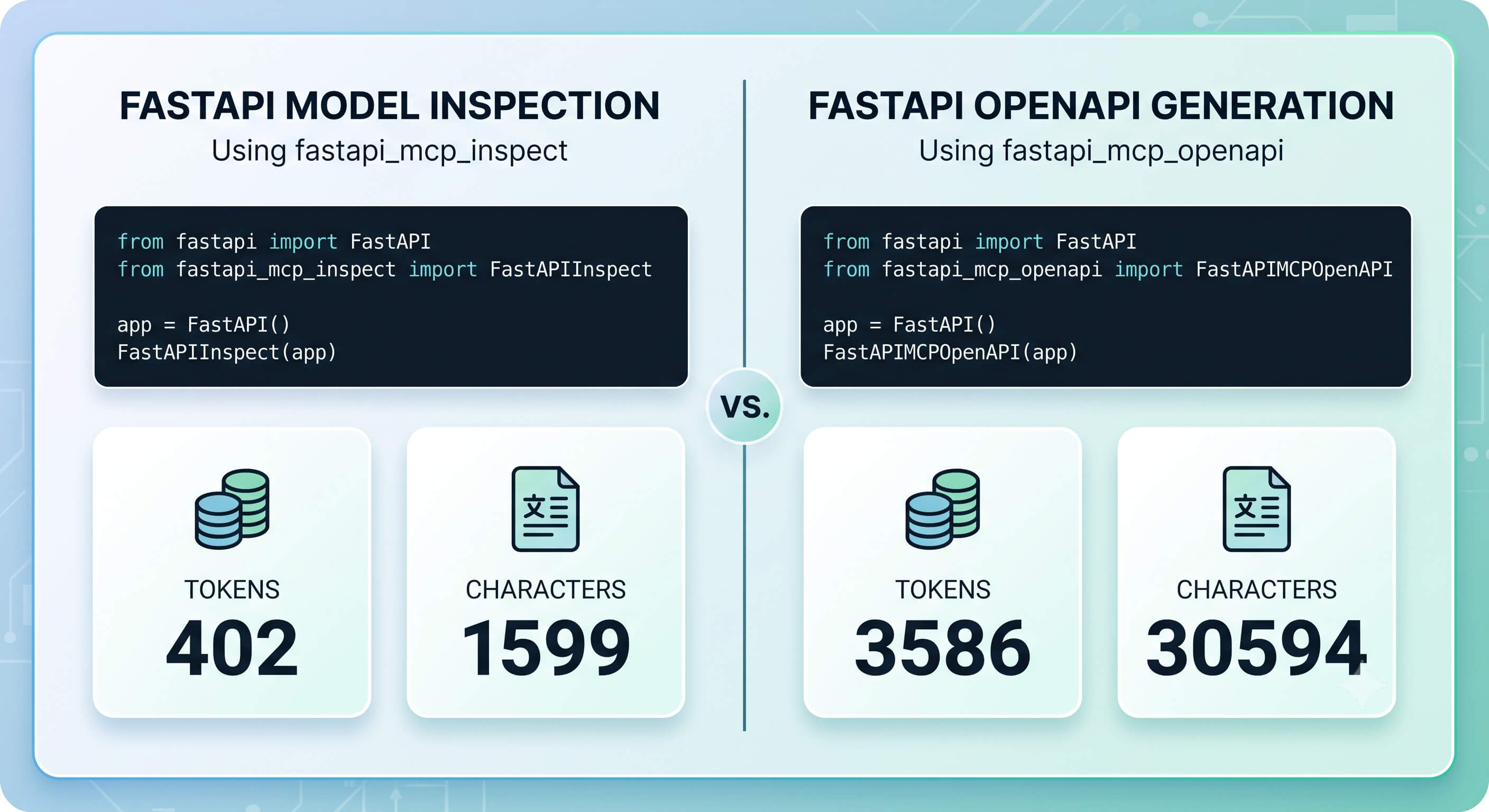
The comparison was done using OpenAI Tokenizer. The biggest difference is that fastapi-mcp-inspect returns only the information the agent actually needs instead of dumping large chunks of JSON into the context window. It also provides a few extra tools that make navigating APIs much easier.
Production usage
I wouldn't recommend exposing this in production because it makes your /mcp endpoint publicly accessible, allowing anyone to inspect your API.
Instead, you can guard it with a simple environment check:
import os

ENV = os.getenv("ENV", "dev").lower()

if ENV == "dev":
    from fastapi_mcp_inspect import FastAPIInspect

    FastAPIInspect(app)
Now the MCP server is only available during development.
Possible additions
One thing I'm interested in adding is a call_endpoint tool so the agent can invoke any available endpoint and inspect real responses. At the same time, I don't want to spend time building something that might not be necessary in the first place.
If that's something you'd find useful, pull requests are more than welcome!
Conclusion
So that's it for this one. It's a pretty niche tool that solves a simple yet frustrating problem. I love vibe-coding because it lets you build small, niche tools like this quickly, so you can solve annoying problems without spending too much time on them.
I know it's been quite some time since I last wrote anything, but I'll try to be more consistent. I'm also reviving my Substack, The Neuron, so if you're interested in getting regular updates on what I've been exploring, AI news, and useful tools, feel free to subscribe (it's free!).
If you found this useful, come say hi on Twitter @inclinedadarsh. I share more about what I'm building there.
Happy Coding ;)
— Adarsh